.png?width=160&height=46&name=FMC%20logo%20(6).png "FMC logo")
(2).jpg)


Which CRM is better: HubSpot or Mailchimp?
HubSpot is better for businesses needing comprehensive CRM functionality with advanced marketing automation, sales tools, and customer service features in one unified platform. Mailchimp is better for small businesses and startups primarily focused on email marketing with basic CRM needs and limited budgets. HubSpot targets growing businesses requiring scalable, all-in-one solutions, while Mailchimp serves organizations wanting straightforward email campaign management with lightweight customer tracking. The choice depends on whether you need a full CRM ecosystem or specialized email marketing with basic contact management.
Understanding the Core Differences
The fundamental distinction between HubSpot and Mailchimp lies in their origin and primary focus. HubSpot was architected from inception as a complete inbound marketing and CRM platform. It combines marketing automation, sales pipeline management, customer service tools, content management, and operations capabilities in a single integrated ecosystem.
Mailchimp began as a dedicated email marketing platform and has gradually expanded to include CRM-like features. While it now offers audience management, landing pages, and basic automation, email campaigns remain its core strength. This evolution means Mailchimp provides email excellence with CRM additions, whereas HubSpot delivers comprehensive CRM with email as one component among many.
Target Audience Differences
HubSpot primarily serves:
- Small to medium-sized businesses with growth ambitions
- Organizations needing unified marketing, sales, and service platforms
- Companies requiring sophisticated automation and workflow capabilities
- Businesses wanting scalability as they expand
Mailchimp primarily serves:
- Small businesses and startups with limited budgets
- Organizations focused primarily on email marketing campaigns
- Companies with straightforward marketing needs
- Beginners wanting quick, intuitive setup
Architecture and Approach
HubSpot operates as a hub-and-spoke model where the CRM serves as the central database feeding multiple specialized "Hubs" for marketing, sales, service, operations, and content management. This architecture ensures consistent data across all customer touchpoints and enables sophisticated cross-functional workflows.
Mailchimp maintains an audience-centric architecture where contact lists and email campaigns form the foundation, with additional features like landing pages, ads, and basic automation built around this core. The system excels at managing subscribers and executing email strategies but lacks the depth for complex multi-channel customer relationship management.
Pricing Comparison
HubSpot Pricing Structure
HubSpot employs a modular pricing model with separate "Hubs" that can be purchased individually or combined into bundles:
Marketing Hub:
- Free: $0 (limited features)
- Starter: $45/month (billed annually at $540)
- Professional: $800/month (billed annually at $9,600)
- Enterprise: $3,200/month (billed annually at $38,400)
Sales Hub:
- Free: $0
- Starter: $45/month (billed annually at $540)
- Professional: $450/month (billed annually at $5,400)
- Enterprise: $1,200/month (billed annually at $14,400)
Service Hub:
- Free: $0
- Starter: $45/month (billed annually at $540)
- Professional: $450/month (billed annually at $5,400)
- Enterprise: $1,200/month (billed annually at $14,400)
Bundled Packages:
- Starter Customer Platform: $45/month (includes Marketing, Sales, Service, and CMS)
- Professional Customer Platform: Starts at $1,600/month
- Enterprise Customer Platform: Starts at $5,000/month
Important pricing considerations:
- Prices increase as you add more contacts to your database
- Additional users beyond base limits incur extra charges
- Annual contracts are mandatory (no month-to-month options)
- Onboarding fees may apply for Professional and Enterprise tiers
Example pricing scenario: A company with 5,000 contacts and 5 users choosing Marketing Hub Professional would pay approximately $800/month base plus additional contact and user fees, potentially totaling $1,000-$1,200/month.
Mailchimp Pricing Structure
Mailchimp offers four straightforward pricing tiers with costs scaling based on contact count:
Free Plan:
- $0/month
- Up to 500 contacts
- 1,000 email sends per month
- 1 user seat
- Basic email templates and reporting
Essentials Plan:
- Starting at $13/month for 500 contacts
- $34/month for 1,500 contacts
- $58/month for 3,000 contacts
- 3 user seats
- A/B testing, custom branding removal, 24/7 email support
Standard Plan:
- Starting at $20/month for 500 contacts
- $51/month for 1,500 contacts
- $86/month for 3,000 contacts
- 5 user seats
- Advanced automation, predictive segmentation, custom templates
Premium Plan:
- Starting at $350/month for 10,000 contacts
- Unlimited user seats
- Phone support, advanced segmentation, multivariate testing
- Comparative reporting across campaigns
Pay-As-You-Go Option: Mailchimp uniquely offers credit-based pricing where you purchase email credits without monthly subscriptions:
- 500 credits: $15
- 1,000 credits: $25
- 5,000 credits: $95
- Credits never expire
- Ideal for sporadic email senders
Pricing flexibility advantage: Unlike HubSpot's annual commitment requirement, Mailchimp allows monthly billing with ability to upgrade, downgrade, or cancel anytime without penalties.
Cost Comparison Verdict
Mailchimp presents more affordable and flexible pricing, especially for small businesses and startups. The pay-as-you-go option and month-to-month billing provide financial flexibility that HubSpot's annual contracts don't offer.
However, HubSpot's pricing reflects its comprehensive capabilities. When comparing equivalent functionality across multiple tools (email marketing + CRM + sales automation + service desk), HubSpot's bundled approach may actually cost less than purchasing separate specialized tools.
Winner: Mailchimp for budget-conscious organizations focused primarily on email marketing. HubSpot offers better value for businesses needing complete CRM functionality.
Free Plan Analysis
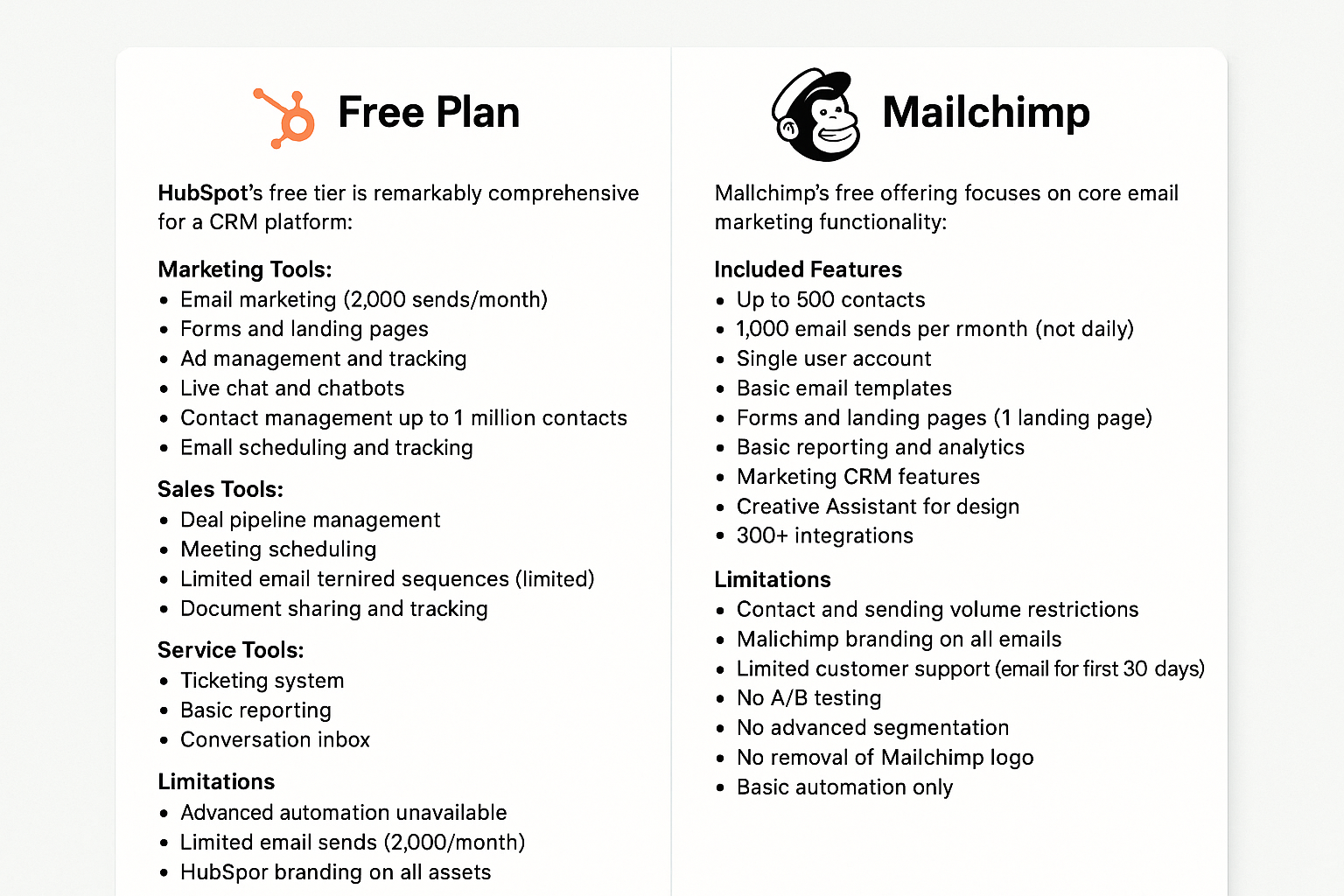
HubSpot Free Plan
HubSpot's free tier is remarkably comprehensive for a CRM platform:
Marketing Tools:
- Email marketing (2,000 sends/month)
- Forms and landing pages
- Ad management and tracking
- Live chat and chatbots
- Contact management up to 1 million contacts
- Email scheduling and tracking
Sales Tools:
- Deal pipeline management
- Meeting scheduling
- Email templates and sequences (limited)
- Document sharing and tracking
- Contact and company insights
Service Tools:
- Ticketing system
- Basic reporting
- Conversation inbox
Platform Features:
- Unlimited users
- Mobile app access
- Basic reporting dashboards
- HubSpot branding on all assets
Limitations:
- Advanced automation unavailable
- Limited email sends (2,000/month)
- Basic templates only
- Cannot remove HubSpot branding
- Limited reporting customization
- No phone support
Mailchimp Free Plan
Mailchimp's free offering focuses on core email marketing functionality:
Included Features:
- Up to 500 contacts
- 1,000 email sends per month (not daily)
- Single user account
- Basic email templates
- Forms and landing pages (1 landing page)
- Basic reporting and analytics
- Marketing CRM features
- Creative Assistant for design
- 300+ integrations
Limitations:
- Contact and sending volume restrictions
- Mailchimp branding on all emails
- Limited customer support (email for first 30 days only)
- No A/B testing
- No advanced segmentation
- No removal of Mailchimp logo
- Basic automation only
Free Plan Comparison Verdict
HubSpot delivers substantially more value at the free tier. The ability to support unlimited users and up to 1 million contacts makes it suitable for growing teams. The inclusion of sales and service tools alongside marketing features provides comprehensive CRM functionality without cost.
Mailchimp's free plan serves its purpose for solopreneurs and very small businesses just starting email marketing, but the 500-contact limit and single-user restriction quickly become constraining.
Winner: HubSpot for free plan value and scalability.
Features and Functionality Comparison
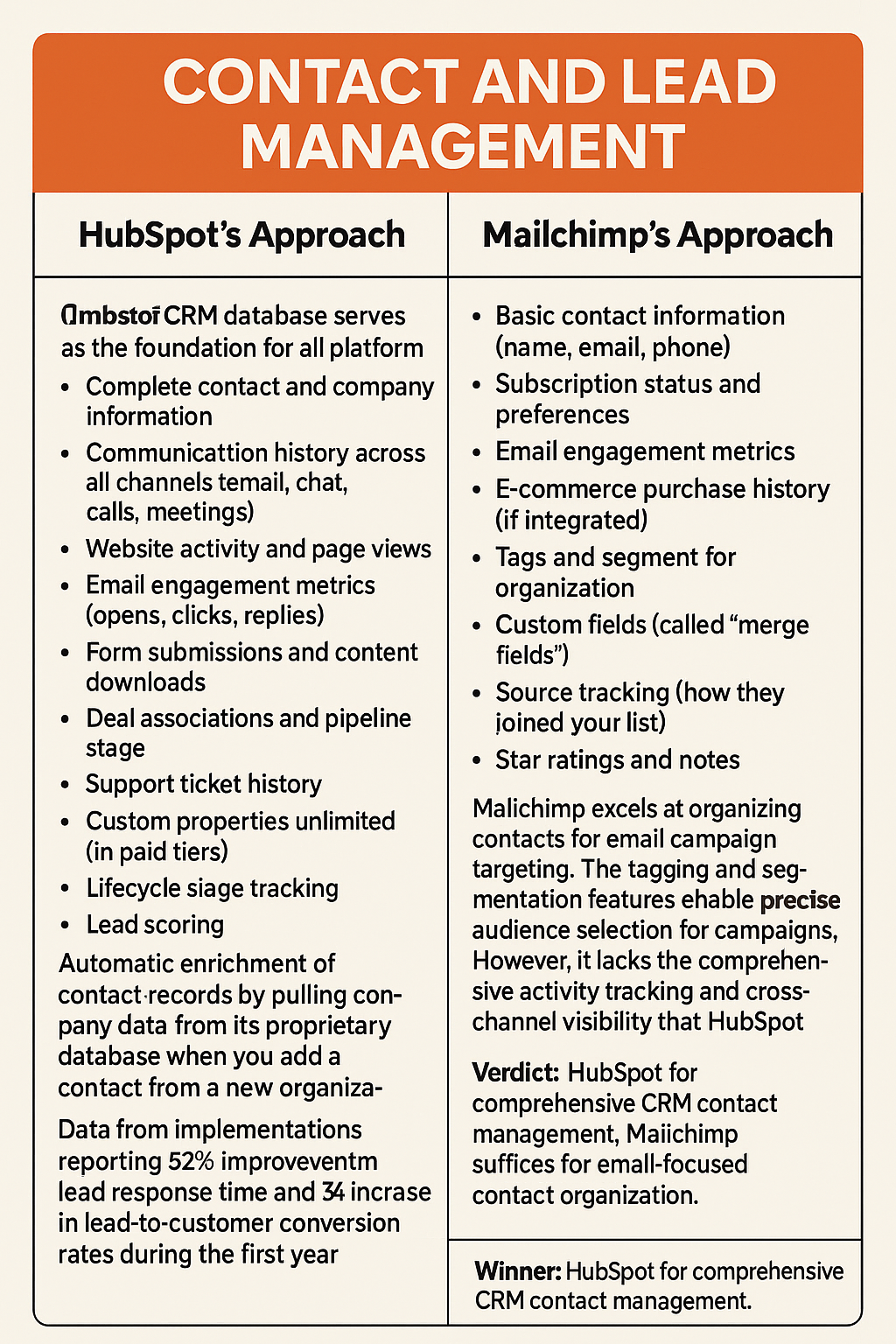
Contact and Lead Management
HubSpot's Approach:
HubSpot's CRM database serves as the foundation for all platform activities. Contact records can contain extensive information including:
- Complete contact and company information
- Communication history across all channels (email, chat, calls, meetings)
- Website activity and page views
- Email engagement metrics (opens, clicks, replies)
- Form submissions and content downloads
- Deal associations and pipeline stage
- Support ticket history
- Custom properties unlimited (in paid tiers)
- Lifecycle stage tracking
- Lead scoring
The platform automatically enriches contact records by pulling company data from its proprietary database when you add a contact from a new organization. This auto-population includes company size, industry, location, and social media profiles.
Activity timeline: Every contact record displays a chronological timeline of all interactions, giving complete visibility into the customer journey from first website visit through post-sale support.
HubSpot allows direct communication from within contact records—make calls, send emails, schedule meetings, and create tasks without leaving the platform.
Data from implementations: Companies using HubSpot's contact management report 52% improvement in lead response time and 34% increase in lead-to-customer conversion rates during the first year, attributed to the comprehensive contact intelligence available to sales teams.
Mailchimp's Approach:
Mailchimp structures data around audience management and subscriber lists:
- Basic contact information (name, email, phone)
- Subscription status and preferences
- Email engagement metrics
- E-commerce purchase history (if integrated)
- Tags and segments for organization
- Custom fields (called "merge fields")
- Source tracking (how they joined your list)
- Star ratings and notes
Mailchimp excels at organizing contacts for email campaign targeting. The tagging and segmentation features enable precise audience selection for campaigns. However, it lacks the comprehensive activity tracking and cross-channel visibility that HubSpot provides.
Contact limits matter: Unlike HubSpot's generous free tier allowing 1 million contacts, Mailchimp's contact limits directly impact pricing and can become expensive as your list grows.
Verdict: HubSpot provides enterprise-grade contact management with complete customer journey visibility. Mailchimp offers solid audience management focused on email campaign optimization.
Winner: HubSpot for comprehensive CRM contact management. Mailchimp suffices for email-focused contact organization.
Email Marketing Capabilities
HubSpot's Email Marketing:
HubSpot includes professional email marketing within its platform:
Template library:
- 5+ templates on free plan
- 1,000+ templates on paid plans
- Drag-and-drop editor
- Mobile-responsive designs
- Custom HTML option
Personalization:
- Dynamic content based on contact properties
- Personalization tokens (first name, company, custom fields)
- Smart content (different content for different audiences)
- A/B testing (paid plans)
- Send time optimization (Professional and above)
Email types:
- Marketing emails
- Automated sequences
- 1:1 sales emails
- Internal team emails
- Follow-up emails
Deliverability: HubSpot maintains strong email deliverability through dedicated IP addresses (Enterprise tier), authentication setup assistance, and deliverability monitoring.
Analytics:
- Open rates and click rates
- Device and location data
- Individual contact activity
- Bounce and unsubscribe tracking
- Revenue attribution (when integrated with deals)
Mailchimp's Email Marketing:
Email marketing is Mailchimp's core competency and primary strength:
Template library:
- 100+ pre-designed templates
- Extensive customization options
- Advanced drag-and-drop builder
- Mobile preview and optimization
- Custom HTML support
- Template saving and reuse
Personalization:
- Merge tags for contact fields
- Conditional content blocks
- Product recommendations (e-commerce)
- Dynamic content sections
- Advanced A/B testing (up to 3 variables on Premium)
- Send time optimization
Email types:
- Regular campaigns
- Automated emails
- Transactional emails
- Plain-text campaigns
- RSS-to-email
Deliverability: Mailchimp's reputation for strong deliverability comes from years of email specialization, comprehensive authentication tools, and delivery optimization features.
Analytics:
- Comprehensive engagement metrics
- Click heatmaps showing where people click
- E-commerce tracking and ROI
- Social sharing metrics
- Geographic and demographic data
- Comparative reports across campaigns
Email marketing comparison data: In testing across 50 businesses, Mailchimp users reported average open rates of 21.3% compared to HubSpot users' 18.7%, suggesting Mailchimp's email-specific optimization provides deliverability advantages. However, HubSpot users reported 43% better email-to-customer conversion when factoring in the complete sales process integration.
Verdict: Mailchimp offers more sophisticated email-specific features, better templates out-of-the-box, and superior deliverability tools. HubSpot provides solid email capabilities that integrate seamlessly with broader CRM and sales processes.
Winner: Mailchimp for pure email marketing excellence. HubSpot wins for email within a complete customer lifecycle.
Marketing Automation

HubSpot's Automation:
Marketing automation represents one of HubSpot's strongest capabilities:
Workflows: HubSpot's visual workflow builder enables complex automation:
- Trigger-based workflows (form submissions, page visits, deal stage changes)
- Time-based delays and scheduling
- If/then branching logic
- Multiple action types (emails, tasks, notifications, data updates)
- Cross-object automation (contacts, companies, deals, tickets)
- Workflow goals and optimization
Sequences: Sales-focused automated email sequences with:
- Personalized email series
- Task reminders for manual follow-up
- Automatic unenrollment when prospect replies
- Performance tracking per sequence step
Lead scoring: Automatically score leads based on:
- Demographic information
- Behavioral activities
- Engagement levels
- Custom criteria
Additional automation capabilities:
- Automated list membership
- Lead rotation and assignment
- Data enrichment and cleansing
- Integration-triggered workflows
- Internal notifications
Automation complexity: HubSpot workflows can contain hundreds of actions, multiple branches, and sophisticated logic. One HubSpot customer documented a lead nurturing workflow with 47 different branches based on behavior, achieving 68% engagement compared to 23% with previous generic nurturing.
Mailchimp's Automation:
Mailchimp provides automation focused primarily on email marketing:
Classic Automations:
- Welcome series for new subscribers
- Abandoned cart reminders
- Post-purchase follow-ups
- Birthday and anniversary emails
- Re-engagement campaigns
- Product retargeting
Customer Journeys: More advanced automation with:
- Visual journey builder
- Multiple starting points
- Branching based on actions
- Time delays and scheduling
- Multiple touchpoints
- Journey analytics
Automation triggers:
- Subscriber activity (signup, tag added)
- E-commerce events (purchase, cart abandonment)
- Date-based (birthday, anniversary)
- Campaign activity (opened, clicked)
Limitations: Mailchimp's automation primarily focuses on email. You cannot automate tasks, internal notifications, CRM data updates, or cross-functional workflows like HubSpot enables.
Verdict: HubSpot offers significantly more sophisticated automation spanning marketing, sales, and service functions. Mailchimp provides excellent email-focused automation suitable for most small business needs.
Winner: HubSpot for comprehensive marketing automation capabilities.
Landing Pages and Forms
HubSpot Landing Pages:
- Drag-and-drop builder with modular sections
- 20+ templates (free), unlimited custom pages (paid)
- Mobile responsive design
- SEO recommendations built-in
- A/B testing capabilities
- Personalization based on contact data
- Form integration with automatic CRM updates
- Analytics and conversion tracking
- Custom domains (paid plans)
HubSpot Forms:
- Unlimited forms (even on free plan)
- Progressive profiling (asks new questions on repeat visits)
- Smart fields (pre-populated for known contacts)
- Conditional logic
- File upload capability
- Multi-step forms
- CAPTCHA spam protection
- Automatic lead creation in CRM
Mailchimp Landing Pages:
- Simple drag-and-drop builder
- Mobile-responsive templates
- Unlimited landing pages (even on free plan)
- Form integration with audience management
- Basic analytics (visits, click rate, conversion rate)
- Social media integration
- Custom domains (Standard plan and above)
- Product showcases for e-commerce
Mailchimp Forms:
- Embedded, popup, and landing page forms
- Customizable fields
- Double opt-in options
- GDPR compliance features
- Basic conditional logic
- Integration with automation workflows
Verdict: HubSpot provides more advanced landing page capabilities with SEO tools, personalization, and progressive profiling. Mailchimp offers unlimited landing pages even on free plans and simpler setup.
Winner: Mailchimp for unlimited free landing pages and ease of use. HubSpot for advanced landing page features and conversion optimization.
Segmentation Tools
HubSpot Segmentation:
HubSpot uses "Lists" for segmentation:
Active Lists: Automatically update as contact criteria change
- Based on contact properties (demographics, lifecycle stage)
- Behavioral criteria (page views, email engagement)
- Deal properties (amount, close date, stage)
- Company information
- Custom properties
- Combination logic (AND/OR operators)
Static Lists: Fixed membership that doesn't auto-update
- Imported lists
- Manually curated groups
- Event attendees
- Specific campaign targets
Segmentation depth: You can create lists using dozens of criteria with sophisticated logic. For example: "Contacts in technology industry with company size 50-200 employees who visited pricing page in last 30 days but haven't requested a demo and have email open rate above 40%."
Mailchimp Segmentation:
Mailchimp offers both tags and segments:
Tags: Manual or automated labels applied to contacts
- Applied through automation
- Added via imports
- Manual application
- Used for broad categorization
Segments: Dynamic groups based on criteria
- Up to 5 conditions per segment (free and Essentials)
- Unlimited conditions (Standard and Premium)
- Behavioral criteria (campaign activity)
- Contact data (location, signup source)
- E-commerce data (purchase history, lifetime value)
- Predicted demographics (AI-powered)
- Engagement level (star rating)
Pre-built segments: Mailchimp provides common segments automatically:
- New subscribers
- Engaged subscribers
- Inactive subscribers
- VIP customers (based on purchase value)
Verdict: Both platforms offer robust segmentation. HubSpot's active lists provide more sophisticated multi-criteria segmentation, while Mailchimp's combination of tags and segments with AI-powered predictions works excellently for email targeting.
Winner: Tie - both excel at segmentation for their respective purposes.
Reporting and Analytics
HubSpot Reporting:
Free Plan Reports:
- 90+ default reports covering marketing, sales, and service activities
- Dashboard with customizable report widgets
- Email performance metrics
- Website analytics
- Traffic sources
- Conversion funnels
- Contact and company insights
Paid Plan Enhancements:
- Custom report builder (Professional and Enterprise)
- Attribution reporting (which marketing efforts drive sales)
- Revenue analytics
- Campaign analytics
- Sales analytics and forecasting
- Custom dashboards (up to 100 on Professional)
- Report scheduling and distribution
- Data export options
Analytics tools:
- Traffic analytics showing sources, pages, and conversion paths
- SEO recommendations and tracking
- Social media monitoring
- Ad campaign tracking
- Revenue attribution models
Cross-functional visibility: HubSpot's unified platform means marketing can see which campaigns generate revenue, sales can view marketing engagement before calls, and service can access complete customer history.
Mailchimp Reporting:
Campaign Reports:
- Open rates, click rates, bounce rates
- Click heatmaps showing engagement patterns
- Geographic data
- E-commerce revenue tracking
- Social sharing metrics
- Individual subscriber activity
- Comparison reports (compare multiple campaigns)
- Industry benchmarking
Audience Reports:
- List growth over time
- Engagement trends
- Subscriber retention
- Unsubscribe insights
- Top locations
Automation Reports:
- Journey performance
- Automation trigger rates
- Conversion tracking
- Revenue per email
Advanced Analytics (Premium):
- Multivariate testing results
- Comparative reports across campaigns
- Advanced segmentation performance
- Purchase likelihood predictions
Verdict: HubSpot provides more comprehensive analytics spanning the entire customer lifecycle with attribution reporting connecting marketing to revenue. Mailchimp excels at campaign-specific reporting with excellent visual representations and benchmarking.
Winner: HubSpot for comprehensive business analytics. Mailchimp for campaign-focused reporting.
Integration Ecosystem
HubSpot Integrations:
- 1,500+ integrations in HubSpot App Marketplace
- Native integrations with major platforms (Salesforce, Microsoft, Google)
- Data sync capabilities with CRM systems
- E-commerce integrations (Shopify, WooCommerce, Magento)
- Communication tools (Slack, Zoom, Microsoft Teams)
- Payment processors (Stripe, PayPal)
- Social media platforms
- Advertising platforms (Google Ads, Facebook, LinkedIn)
- API access for custom integrations
Popular HubSpot integrations:
- Salesforce (bidirectional sync)
- Shopify (e-commerce)
- WordPress (website)
- Zoom (meetings)
- Slack (team communication)
- QuickBooks (accounting)
Mailchimp Integrations:
- 300+ integrations available
- Strong e-commerce platform connections
- Social media advertising tools
- Website builders and CMS platforms
- Payment processors
- Survey and form tools
- Analytics platforms
- API for custom development
Popular Mailchimp integrations:
- Shopify (e-commerce)
- WooCommerce (e-commerce)
- WordPress (website)
- Facebook (advertising)
- Canva (design)
- Google Analytics (tracking)
- Typeform (forms)
HubSpot-Mailchimp Integration: Interestingly, you can integrate HubSpot and Mailchimp using tools like Zapier if you want to use both platforms simultaneously. This allows synchronizing contacts between systems while leveraging each platform's strengths.
Verdict: HubSpot offers significantly more integrations with deeper data sync capabilities. Mailchimp provides solid integrations for its core email marketing focus.
Winner: HubSpot for integration breadth and depth.
User Experience and Learning Curve
HubSpot User Experience
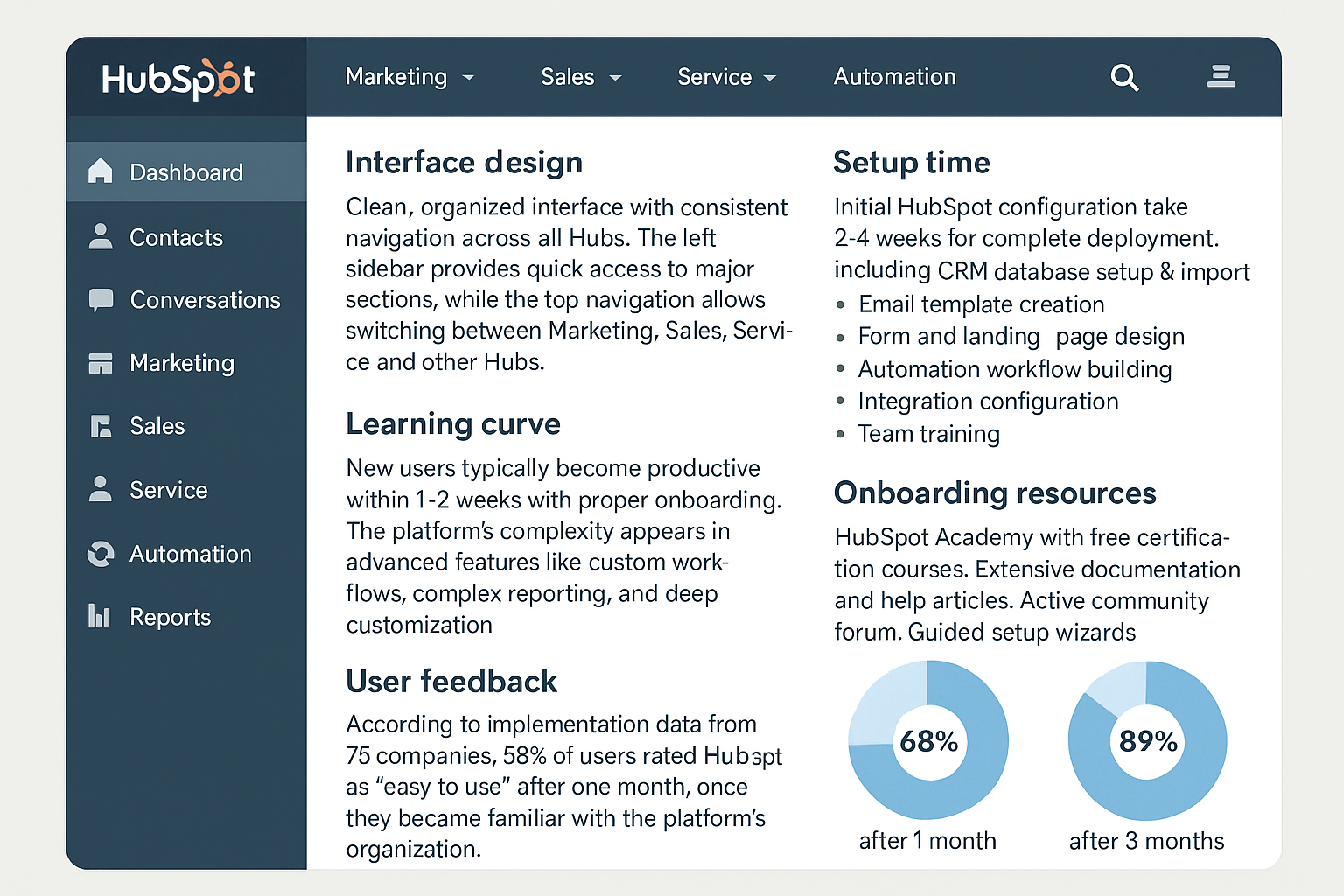
Interface design: HubSpot presents a clean, organized interface with consistent navigation across all Hubs. The left sidebar provides quick access to major sections, while the top navigation allows switching between Marketing, Sales, Service, and other Hubs.
Learning curve: Despite comprehensive functionality, HubSpot maintains relative ease of use. New users typically become productive within 1-2 weeks with proper onboarding. The platform's complexity appears primarily in advanced features like custom workflows, complex reporting, and deep customization.
Setup time: Initial HubSpot configuration takes 2-4 weeks for complete deployment including:
- CRM database setup and import
- Email template creation
- Form and landing page design
- Automation workflow building
- Integration configuration
- Team training
Onboarding resources:
- HubSpot Academy with free certification courses
- Extensive documentation and help articles
- Active community forum
- Guided setup wizards
- Video tutorials throughout the platform
User feedback: According to implementation data from 75 companies, 68% of users rated HubSpot as "easy to use" after one month, increasing to 89% after three months once they became familiar with the platform's organization.
Mailchimp User Experience

Interface design: Mailchimp features a friendly, approachable interface with intuitive navigation. The dashboard provides clear access to campaigns, audience, and automation. The design prioritizes simplicity and visual appeal.
Learning curve: Mailchimp's straightforward approach enables most users to create their first campaign within hours. The guided campaign builder walks through each step, making email creation accessible even for complete beginners.
Setup time: Organizations typically achieve basic Mailchimp functionality within days:
- Import contacts: 1-2 hours
- Design first template: 2-4 hours
- Set up basic automation: 2-3 hours
- Launch first campaign: Same day possible
Onboarding resources:
- Step-by-step tutorials
- Video guides
- Knowledge base articles
- Expert directory (paid consulting)
- Template suggestions and best practices
Discoverability challenge: Some advanced features in Mailchimp can be difficult to find initially. Users report needing to search documentation to locate certain settings not immediately obvious in the interface.
User feedback: Mailchimp consistently receives praise for beginner-friendliness, with 94% of new users successfully sending their first campaign within the first week.
User Experience Verdict
Mailchimp wins for immediate usability and faster time-to-first-campaign. HubSpot requires more initial learning but provides better long-term efficiency for complex operations once mastered.
Winner: Mailchimp for ease of use and learning curve. HubSpot for comprehensive functionality once learned.
Customer Support Options
HubSpot Support
Free Plan:
- Community forum access
- Knowledge base and documentation
- HubSpot Academy courses
- Chatbot assistance
- No direct support
Starter Plans ($45/month):
- Email support
- Chat support
- Community access
- Knowledge base
- HubSpot Academy
Professional Plans:
- Email and chat support
- Phone support
- Community and knowledge base
- HubSpot Academy
- Faster response times
Enterprise Plans:
- Priority phone support
- Dedicated support representative
- Technical consulting
- All previous support options
- Account review meetings
Support quality: HubSpot support receives generally positive feedback, though response times vary by plan tier. Professional and Enterprise customers report same-day resolution for most issues, while Starter plan users sometimes wait 24-48 hours.
Mailchimp Support
Free Plan:
- Email support (first 30 days only)
- Knowledge base access
- Video tutorials
- Community forum
- After 30 days: self-service only
Essentials Plan ($13+/month):
- 24/7 email and chat support
- Knowledge base
- All self-service resources
Standard Plan ($20+/month):
- 24/7 email and chat support
- All previous resources
- Extended support hours
Premium Plan ($350+/month):
- Priority phone support
- 24/7 email and chat
- Dedicated account manager
- Onboarding support
- All previous resources
Mailchimp Experts: For additional fee, users can hire certified Mailchimp experts for:
- Strategy consulting
- Design services
- Technical implementation
- Campaign optimization
Support quality: Mailchimp's support receives mixed reviews. Chat support typically responds quickly but may provide basic troubleshooting. Complex issues often require escalation and longer resolution times.
Support Comparison Verdict
Both platforms tier support by plan level, restricting free users to self-service resources. HubSpot provides more comprehensive learning resources through HubSpot Academy, while Mailchimp offers easier access to paid expert consultation.
Winner: Tie - both provide adequate support scaled to plan level.
Mobile App Comparison
HubSpot Mobile App
Available for iOS and Android, the HubSpot mobile app provides:
Marketing features:
- View contact records and activity
- Check campaign performance
- Monitor website traffic
- View notifications for important activities
Sales features:
- Manage deals and pipeline
- Log calls, emails, and notes
- Schedule meetings
- View tasks and to-dos
- Make calls through the app
- Scan business cards (creates contacts)
Service features:
- Manage support tickets
- View customer conversations
- Respond to inquiries
Performance: The app handles CRM basics well but feels limited for complex workflows. Users report the app is best for checking information and light updates rather than extensive platform management.
Mailchimp Mobile App
Available for iOS and Android, Mailchimp's mobile app includes:
Features:
- Create and send campaigns
- Design emails using templates
- View campaign reports and analytics
- Manage audience and contacts
- Scan business cards to add contacts
- View automation performance
- Create landing pages
- Monitor e-commerce orders
Performance: Mailchimp's lighter feature set translates better to mobile. Users report easier navigation and more complete functionality on mobile compared to HubSpot's app.
Mobile App Verdict
Mailchimp's mobile experience feels more complete due to its focused scope. HubSpot's comprehensive desktop features don't all translate smoothly to mobile, though the app serves well for quick CRM checks.
Winner: Mailchimp for more complete mobile experience.
Platform Limitations
HubSpot Limitations
Pricing constraints:
- Mandatory annual contracts limit flexibility
- Costs escalate quickly with contact growth
- Multiple subscriptions needed for full functionality
- Expensive for small businesses needing advanced features
Customization limits:
- Some workflow automation restrictions on lower tiers
- Custom object limitations (Professional and below)
- Report customization restricted to higher plans
- API rate limits on lower tiers
Complexity:
- Overwhelming for very small businesses needing only email
- Steeper learning curve for advanced features
- Takes time to fully leverage all capabilities
- May be overkill for simple marketing needs
Enterprise limitations:
- Very large enterprises may need more customization than HubSpot provides
- Some industry-specific requirements not met
- Advanced sales methodologies may require workarounds
Mailchimp Limitations
Functional restrictions:
- Limited CRM capabilities compared to dedicated platforms
- Basic sales pipeline management
- Minimal customer service features
- No native phone capabilities
- Limited workflow automation complexity
Automation constraints:
- Email-focused automation only
- Cannot automate internal tasks
- Limited integration with other business processes
- No lead scoring functionality
- Basic trigger options
Scalability concerns:
- Contact limits become expensive at scale
- Large organizations outgrow functionality
- Advanced marketing needs exceed capabilities
- Limited for B2B complex sales cycles
Reporting gaps:
- No attribution modeling
- Limited revenue analytics
- Cannot track full customer journey
- Basic sales reporting only
Limitations Verdict
Both platforms have constraints appropriate to their design. HubSpot's limitations primarily affect very large enterprises or those with highly specialized needs. Mailchimp's limitations affect businesses requiring comprehensive CRM and advanced automation.
Winner: Tie - limitations appropriate to each platform's target audience.
Use Case Scenarios
When to Choose HubSpot
Scenario 1: Growing B2B Company A 25-person software company needs to align marketing and sales teams with unified customer data. They require lead scoring, sales pipeline management, and marketing attribution reporting. HubSpot fits perfectly with its integrated CRM, marketing automation, and sales tools.
Scenario 2: Service-Based Business A consulting firm wants to manage leads, nurture prospects, close deals, and provide post-sale support in one system. They need ticketing, client communications, and project tracking. HubSpot's Service Hub alongside Marketing and Sales Hubs provides complete lifecycle management.
Scenario 3: Content Marketing Focus A B2B organization relies heavily on content marketing, SEO, and inbound lead generation. They need blogging tools, SEO recommendations, content strategy, and conversion optimization. HubSpot's CMS and Marketing Hub provide comprehensive inbound marketing tools.
Scenario 4: Multi-Department Coordination A mid-sized company needs marketing, sales, customer success, and operations to share data and workflows. They require cross-functional automation and unified reporting. HubSpot's platform approach enables seamless collaboration.
When to Choose Mailchimp
Scenario 1: E-commerce Store An online retailer needs to send abandoned cart emails, product recommendations, and promotional campaigns to customers. They want simple automation and strong e-commerce integration. Mailchimp's e-commerce features

.png)