.png?width=160&height=46&name=FMC%20logo%20(6).png "FMC logo")



Why Insurance Agents Need Specialized CRM Software
The insurance industry operates differently from typical sales environments. You're not just closing deals—you're managing long-term relationships that span years or even decades. Each client represents multiple policies, regular renewals, complex compliance requirements, and ongoing service needs that extend far beyond the initial sale.
Generic CRM software falls short because it's built for transactional sales cycles, not the unique demands of insurance operations. You need systems that understand policy lifecycles, track carrier relationships, automate renewal reminders, manage commission structures, and maintain detailed compliance documentation.
Consider these industry realities:
Customer Retention is Critical: Acquiring new insurance customers costs 5-25 times more than retaining existing ones. Your CRM needs robust retention tools, not just lead generation features.
Regulatory Compliance is Non-Negotiable: Insurance agents face strict licensing requirements, documentation standards, and audit trails. Standard CRMs don't account for these industry-specific regulations.
Multi-Policy Management is Complex: Most clients hold multiple policies that renew on different schedules. Managing this complexity requires purpose-built tools that generic CRMs simply don't provide.
Commission Tracking Demands Precision: Insurance compensation structures involve splits, overrides, carrier-specific rates, and chargebacks. This complexity exceeds what basic CRMs can handle effectively.
The right insurance CRM transforms how you work—automating routine tasks, preventing policy lapses, identifying cross-sell opportunities, and ensuring you never miss critical renewal dates. It becomes the operational backbone that lets you focus on what matters most: building trust and serving clients exceptionally well.
What Makes Insurance CRM Different from Standard CRM
Insurance CRM software (often called Agency Management Systems or AMS) goes beyond basic contact management to address the complete policy lifecycle and operational complexity unique to insurance businesses.
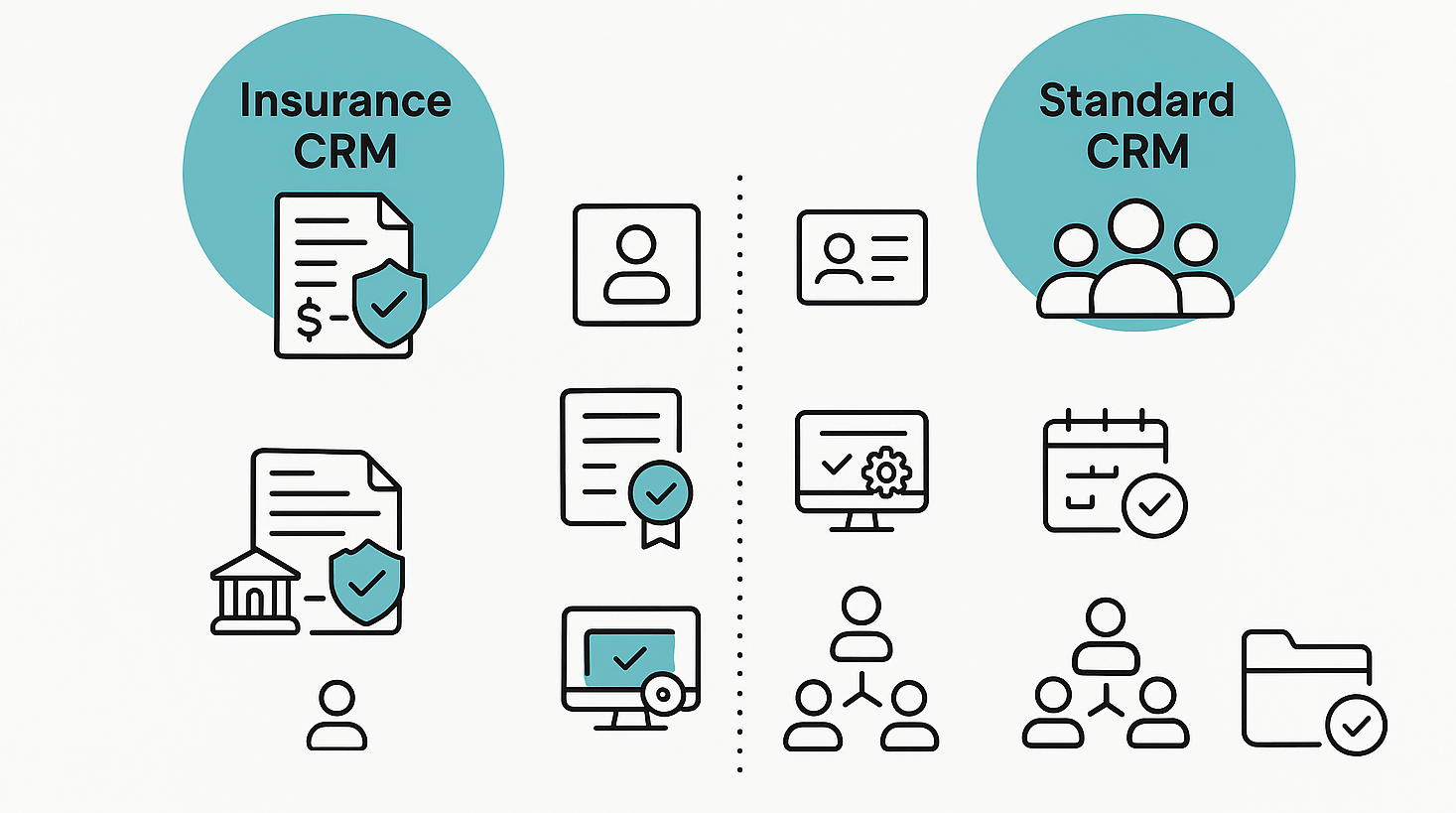
Core Differentiators
Policy-Centric Architecture
While standard CRMs organize around contacts and deals, insurance CRMs structure data around policies. Each policy becomes its own record with carrier information, coverage details, premium amounts, renewal dates, and complete service history. This architecture reflects how insurance agencies actually operate.
Built-in Compliance Features
Insurance-specific CRMs include license tracking, E&O requirement monitoring, carrier appointment management, and audit trail documentation that standard systems lack. These aren't optional features—they're operational necessities.
Carrier Integration Capabilities
The best insurance CRMs connect directly with carrier systems for real-time policy data, automated commission downloads, and streamlined application processes. Generic CRMs require extensive custom integration work to achieve similar functionality.
Renewal Management Automation
Unlike one-time sales, insurance involves perpetual renewal cycles. Purpose-built systems automate renewal tracking, trigger reminder sequences at optimal times, and flag at-risk policies before they lapse.
Commission Processing Tools
Insurance compensation structures are uniquely complex. Specialized CRMs calculate splits accurately, reconcile carrier statements, identify missing commissions, and generate producer reports automatically.
Document Management for Compliance
Insurance operations require secure storage of applications, policy documents, signed forms, and correspondence. Industry-specific CRMs provide compliant document management with proper version control and audit capabilities.
When Standard CRM Might Work
Some insurance agencies—particularly those in early stages with straightforward operations—can adapt general-purpose CRMs like HubSpot or Zoho through customization. However, as your book of business grows and operational complexity increases, purpose-built insurance CRM becomes essential rather than optional.
Key Features to Look for in Insurance CRM Software
Not all insurance CRMs deliver equal value. When evaluating options, prioritize these capabilities:
Essential Features
Comprehensive Policy Management
Your system should track every policy detail: effective dates, coverage amounts, premium schedules, carrier information, and renewal dates. Look for visual timelines that show each client's complete policy portfolio at a glance.
Automated Renewal Workflows
The CRM should trigger renewal processes automatically based on customizable timelines. This includes client notifications, internal task assignments, quote preparation reminders, and follow-up sequences for non-responsive clients.
Client Communication Tools
Built-in email, SMS, and calling capabilities with templates specific to insurance scenarios (renewal reminders, claim status updates, policy change confirmations) save enormous time and ensure consistent messaging.
Commission Management
Robust commission tools reconcile carrier statements against internal records, calculate agent splits accurately, identify discrepancies, and generate commission reports for both individual producers and agency-level analysis.
Carrier Relationship Tracking
Maintain detailed records of carrier appointments, contracting status, production requirements, and bonus thresholds. The system should alert you when production levels might affect appointment status.
Compliance and License Management
Track agent licenses by state, renewal deadlines, continuing education requirements, E&O coverage dates, and carrier appointment expiration dates. Automated reminders prevent costly lapses.
Mobile Accessibility
Insurance agents work from client locations, not just desks. Your CRM must deliver full functionality through mobile apps, not just limited viewing capability.
Reporting and Analytics
Generate insights on renewal retention rates, policy type distribution, revenue by carrier, producer performance, and pipeline health. Good analytics help you manage the business strategically, not just operationally.
Advanced Features Worth Considering
Marketing Automation: Sophisticated agencies benefit from drip campaigns, birthday messages, policy anniversary communications, and educational content sequences that nurture client relationships proactively.
E-Signature Integration: Streamline application processes by collecting signatures digitally within your CRM workflow rather than managing separate systems.
Quote Comparison Tools: Some insurance CRMs include rating engines that let you compare multiple carrier options quickly, then present professional proposals to clients.
Client Portal Access: Self-service portals where clients view policy documents, make payments, submit service requests, and update information reduce administrative burden.
AI-Powered Insights: Leading-edge systems now use artificial intelligence to identify cross-sell opportunities, predict lapse risk, and recommend optimal contact timing.
The 10 Best Insurance CRM Solutions for 2026
1. AgencyBloc - Best for Life & Health Insurance Agencies
Why It Stands Out: AgencyBloc is purpose-built specifically for life, health, and benefits insurance agencies. Unlike general CRMs adapted for insurance, this platform understands the unique workflows of health insurance operations from the ground up.
AgencyBloc dashboard showing policy management, client tracking, and commission processing tools AgencyBloc's interface provides complete visibility into client relationships, policies, and agency operations
Key Strengths:
- Complete 360-degree client view showing every policy, interaction, and document in one place
- Powerful workflow automation that eliminates repetitive tasks and prevents missed follow-ups
- Sophisticated commission processing that reconciles carrier statements and identifies missing payments
- Built-in compliance tracking for licenses, appointments, and carrier requirements
- Exceptional customer support with responsive technical team
The platform really shines for agencies managing group benefits, Medicare Advantage, ACA plans, and supplemental products. The workflow builder lets you create automated processes for everything from new client onboarding to annual enrollment periods.
Limitations:
- Less suitable for property & casualty insurance operations
- Steeper learning curve due to extensive feature set
- May be overkill for solo agents with very simple books of business
- Pricing on the higher end compared to basic options
Pricing: Custom pricing starting around $109/month; AMS+ solution available in three tiers (Grow, Accelerate, and custom Enterprise options). Free trial available.
Best For: Life and health insurance agencies, benefits brokers, Medicare specialists, IMOs/FMOs, and agencies with 3+ agents seeking comprehensive management capabilities.
2. Salesforce Financial Services Cloud - Best for Enterprise-Level Operations
Why It Stands Out: Salesforce brings enterprise-grade power and near-infinite customization capability to insurance operations. The Financial Services Cloud provides insurance-specific functionality built on Salesforce's industry-leading platform.
Key Strengths:
- Unmatched scalability supporting agencies from 10 to 10,000+ users
- Deeply customizable to match any workflow or business model
- Robust integration ecosystem connecting with virtually any system
- Advanced analytics and AI-powered insights through Einstein
- Comprehensive automation capabilities across all business processes
- Strong mobile experience for agents working in the field
Salesforce excels when you need complex automation, detailed analytics, or integration with specialized systems. Large agencies with diverse product lines, multiple locations, and sophisticated operational requirements find tremendous value here.
Limitations:
- Significant implementation complexity requiring expertise or consultants
- Higher total cost of ownership including implementation, customization, and ongoing maintenance
- Steep learning curve for users and administrators
- Can be excessive for small agencies or simple operations
Pricing: Starts around $25/user/month for basic plans, but insurance-specific implementations typically run $100+/user/month depending on customization needs. Implementation costs can be substantial.
Best For: Large insurance agencies, MGAs, brokerages with multi-state operations, enterprises requiring deep customization, and organizations with dedicated IT resources.
3. HubSpot CRM - Best Free Option for Insurance Startups
Why It Stands Out: HubSpot offers the most capable free CRM available, making it ideal for new insurance agents building their business without significant capital investment.
Key Strengths:
- Completely free tier with unlimited users and contacts
- Intuitive interface requiring minimal training
- Strong email marketing tools included at no cost
- Deal pipeline tracking and task automation
- Excellent mobile apps for iOS and Android
- Live chat and basic support ticket system included
- Seamless upgrade path as your agency grows
HubSpot won't handle insurance-specific needs like commission processing or carrier appointment tracking out of the box. However, custom properties and workflows let you adapt the system for basic policy management, renewal tracking, and client communication.
Limitations:
- Not purpose-built for insurance; requires customization
- Free tier lacks advanced automation and reporting
- No native commission processing capabilities
- Limited document management compared to insurance-specific platforms
- HubSpot branding on marketing emails in free tier
Pricing: Free tier available indefinitely; Sales Hub Starter at $15/user/month; Professional at $90/user/month; Enterprise at $150/user/month.
Best For: New insurance agents, solo practitioners, small agencies testing CRM systems before committing to paid solutions, and agencies prioritizing marketing automation alongside basic CRM.
4. Zoho CRM - Best for Customization and Flexibility
Why It Stands Out: Zoho CRM provides exceptional customization capabilities at reasonable price points, making it popular among insurance agencies that want to build precisely the system they need.
Key Strengths:
- Blueprint feature lets you map insurance-specific workflows visually
- Custom modules for policies, carriers, and commissions
- Extensive integration options through native connectors and Zapier
- Strong workflow automation reducing manual task burden
- Solid mobile app with offline capability
- AI assistant (Zia) provides insights and predictions
- Multiple deployment options including cloud and on-premise
The platform requires investment to customize for insurance workflows, but once configured, it provides powerful, tailored functionality. Agencies appreciate being able to build exactly what they need rather than adapting to rigid structures.
Limitations:
- Significant setup time required for insurance-specific configuration
- Interface can feel dated compared to newer platforms
- Support quality varies; documentation could be more comprehensive
- Some features only available at higher tier levels
Pricing: Free plan for up to 3 users; Standard at $14/user/month; Professional at $23/user/month; Enterprise at $40/user/month; Ultimate at $52/user/month (annual billing).
Best For: Insurance agencies wanting maximum flexibility, teams with technical resources to handle customization, agencies already using other Zoho products, and mid-size agencies needing robust features without enterprise costs.
5. Insureio - Best for Life Insurance Agents
Why It Stands Out: Insureio focuses exclusively on life insurance operations, providing specialized tools that directly address the daily needs of life insurance professionals.
Key Strengths:
- Dashboard customized for life insurance workflows showing leads by carrier and policy status
- Built-in marketing automation for birthday messages, policy anniversaries, and renewal campaigns
- Carrier-specific tracking helping manage appointments and production requirements
- Simple, focused interface without unnecessary complexity
- Quick implementation requiring minimal training
- Designed specifically for individual life insurance producers
The platform understands life insurance sales cycles and provides exactly what agents need without overwhelming them with features designed for other insurance types.
Limitations:
- Not suitable for P&C or health insurance operations
- Interface design feels dated compared to modern platforms
- Limited advanced features compared to comprehensive systems
- Smaller user community and third-party integration ecosystem
Pricing: Paid plans start at $25/month with tiered options based on feature requirements.
Best For: Individual life insurance agents, small life insurance agencies, captive agents needing focused tools, and producers who want simplicity over comprehensive functionality.
6. Pipedrive - Best for Sales-Driven Insurance Teams
Why It Stands Out: Pipedrive excels at visual pipeline management and sales process optimization, making it valuable for insurance teams that prioritize new business generation.
Key Strengths:
- Highly visual deal tracking with drag-and-drop pipeline management
- AI-powered insights identifying which deals to prioritize
- Excellent email integration and tracking
- Clean, intuitive interface with minimal learning curve
- Strong mobile experience for field sales
- Activity-based selling methodology built into the platform
- Robust reporting on sales performance and pipeline health
Pipedrive works well for agencies where the primary focus is generating and converting new business rather than complex policy servicing. It's particularly effective for commercial lines where sales cycles involve multiple touchpoints.
Limitations:
- Not insurance-specific; requires customization for policy management
- Lacks commission processing and renewal automation native to insurance platforms
- Limited document management compared to agency management systems
- Better for sales than ongoing client service operations
Pricing: Essential at $14/user/month; Advanced at $39/user/month; Professional at $49/user/month; Power at $64/user/month; Enterprise at $99/user/month (annual billing). 14-day free trial available.
Best For: Insurance agencies emphasizing new business development, commercial lines brokers with longer sales cycles, agencies wanting strong sales analytics, and teams transitioning from spreadsheets to formal CRM.
7. Applied Epic - Best for Property & Casualty Insurance
Why It Stands Out: Applied Epic (formerly TAM) is the industry standard for property and casualty insurance agencies, providing comprehensive functionality specifically for P&C operations.
Key Strengths:
- Complete P&C agency management including ACORD forms integration
- Deep carrier connectivity with download capabilities for many major carriers
- Robust accounting features including trust accounting for premium handling
- Policy checking and renewal processing automation
- Extensive reporting for agency metrics and carrier performance
- Large user community and mature ecosystem
- Regular updates and improvements from Applied Systems
Applied Epic handles the complete P&C workflow from quoting through policy issuance, renewal, and claims tracking. The platform's maturity means it anticipates P&C operational needs thoroughly.
Limitations:
- Significant cost representing major budget commitment
- Complex system requiring substantial training investment
- Can feel dated compared to newer cloud-native platforms
- Overkill for agencies not heavily focused on P&C
Pricing: Custom pricing typically starting at several hundred dollars per month depending on agency size and feature requirements. Contact Applied Systems for specific quotes.
Best For: Property and casualty insurance agencies, personal lines agencies, commercial lines specialists, and independent agencies with established P&C book of business.
8. Nexsure - Best for Independent Insurance Agencies
Why It Stands Out: Nexsure provides cloud-based agency management designed specifically for independent insurance agencies across multiple lines of business.
Key Strengths:
- True cloud architecture accessible from anywhere
- Handles personal lines, commercial lines, and benefits under one system
- Strong carrier connectivity for download and integration
- Intuitive interface requiring less training than legacy systems
- Regular feature updates and improvements
- Solid mobile capabilities for remote work
- Comprehensive reporting and analytics
Nexsure balances ease of use with robust functionality, making it accessible to smaller agencies while scaling to meet mid-size agency needs.
Limitations:
- Newer platform with smaller user base than established systems
- Integration ecosystem still developing
- Some advanced features lag behind mature competitors
- Limited customization compared to platforms like Salesforce
Pricing: Custom pricing based on agency size and feature requirements. Contact Vertafore (Nexsure's parent company) for specific quotes.
Best For: Independent insurance agencies selling multiple lines, agencies transitioning from desktop systems to cloud, small to mid-size agencies prioritizing ease of use, and agencies wanting modern interface design.
9. Vertafore AMS360 - Best for Mid-Size to Large Agencies
Why It Stands Out: AMS360 represents the premium tier of agency management systems, providing enterprise-grade capabilities for established agencies with complex operations.
Key Strengths:
- Comprehensive functionality covering all insurance lines
- Deep integration with Vertafore's ecosystem (rating, comparative raters, loss runs)
- Robust accounting and financial management features
- Extensive customization and configuration options
- Strong carrier connectivity and download capabilities
- Mature reporting and analytics tools
- Large user community and extensive training resources
AMS360 is built for agencies that have outgrown simpler systems and need enterprise-level capabilities to manage sophisticated operations efficiently.
Limitations:
- Premium pricing reflecting enterprise positioning
- Complexity requiring dedicated administrative resources
- Longer implementation timeline compared to simpler systems
- May be excessive for very small agencies
Pricing: Custom enterprise pricing typically in the range of $300-500+/month depending on agency size and features. Contact Vertafore for detailed quotes.
Best For: Mid-size to large insurance agencies, agencies with complex accounting needs, multi-location agencies, agencies requiring deep customization, and established agencies prioritizing comprehensive functionality over cost.
10. EZLynx - Best All-in-One for Independent Agents
Why It Stands Out: EZLynx combines agency management, comparative rating, and marketing automation in one integrated platform designed specifically for independent insurance agencies.
Key Strengths:
- Integrated comparative rater eliminating need for separate rating system
- Built-in marketing automation and lead management
- Consumer-facing tools including quote forms and client portals
- Strong personal lines capabilities
- Cloud-based accessibility from any device
- Regular feature additions and improvements
- Single-platform approach reducing integration complexity
EZLynx's all-in-one approach appeals to independent agencies wanting comprehensive capabilities without managing multiple separate systems.
Limitations:
- Commercial lines capabilities less developed than personal lines
- Some users find interface less intuitive than competitors
- Customization options more limited than open platforms
- Premium pricing for full feature set
Pricing: Custom pricing based on agency size and features. Contact EZLynx for specific quotes. Typically positioned as mid-market solution.
Best For: Independent insurance agencies, personal lines specialists, agencies wanting integrated rating capabilities, new agencies building complete tech stack, and agencies prioritizing all-in-one simplicity.
How to Choose the Right Insurance CRM for Your Agency
Selecting insurance CRM software represents a significant decision with long-term implications. Follow this framework to make the choice that serves your agency best:
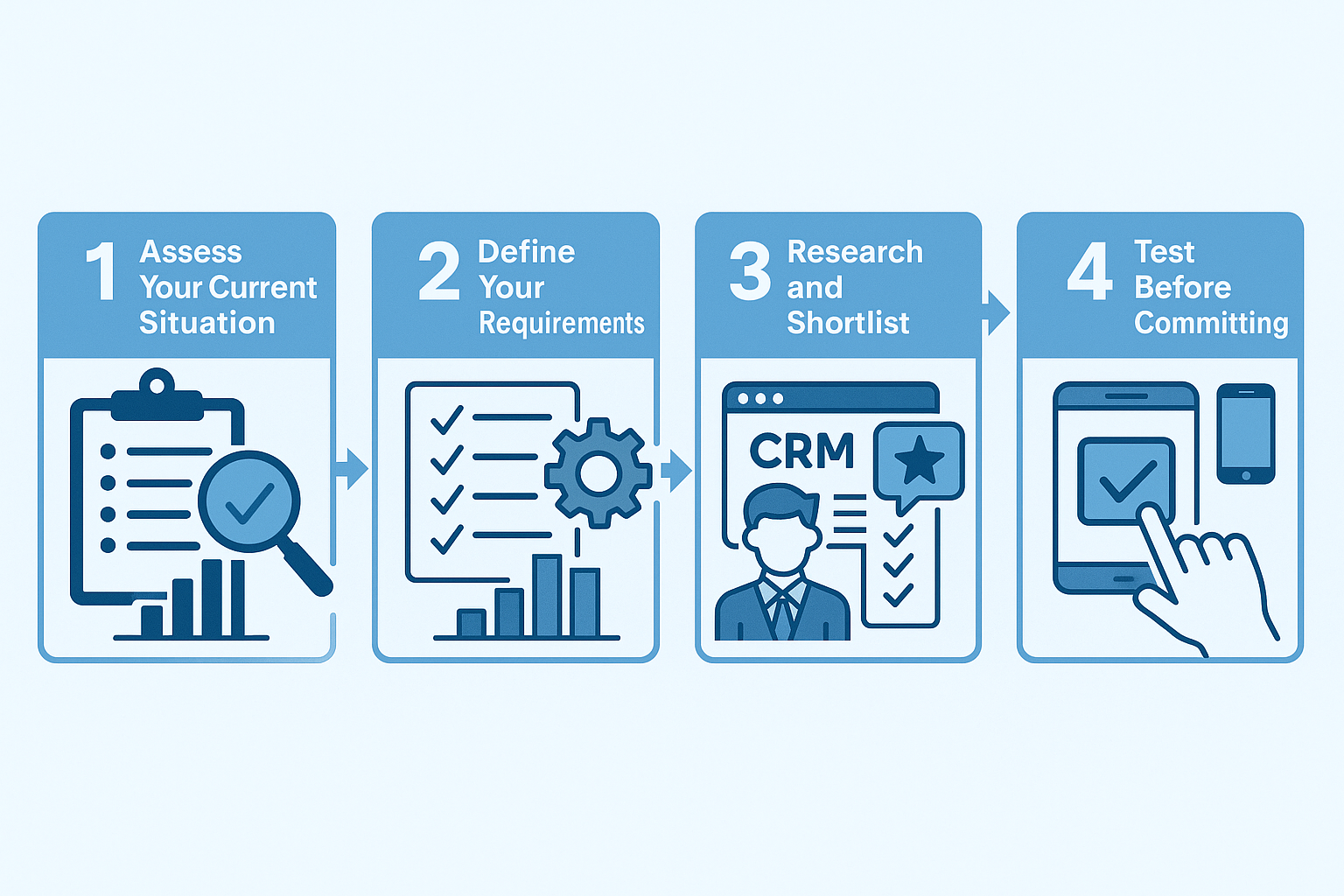
Step 1: Assess Your Current Situation
Document Your Pain Points: What problems are you trying to solve? Missed renewals? Disorganized client data? Inefficient quoting? Commission tracking issues? Your pain points should drive feature priorities.
Evaluate Your Insurance Focus: Different CRMs excel for different insurance types. Life and health operations need different tools than P&C agencies. Be honest about your primary business and choose accordingly.
Consider Your Agency Size: Solo agents have different needs than 5-person teams, which differ from 50-person operations. Don't overspend on enterprise features you won't use, but don't choose systems you'll outgrow immediately.
Assess Technical Capabilities: Do you have IT resources for implementation and maintenance? Some platforms require significant technical expertise while others work out of the box.
Step 2: Define Your Requirements
Must-Have Features: List the capabilities you absolutely cannot operate without. These might include policy management, renewal tracking, commission processing, or specific carrier integrations.
Nice-to-Have Features: Identify features that would improve operations but aren't dealbreakers. Marketing automation, advanced reporting, or client portals might fall here.
Integration Needs: Catalog your current tools (email, accounting software, rating systems, carrier portals). Your CRM should integrate with these or replace them effectively.
Budget Parameters: Establish realistic budget including not just subscription costs but also implementation, training, and ongoing maintenance expenses.
Step 3: Research and Shortlist
Research Thoroughly: Read reviews from actual insurance agencies (not just generic CRM reviews). Look for feedback from agencies similar to yours in size and focus.
Request Demonstrations: Don't rely solely on marketing materials. Schedule demos with your shortlist and bring specific scenarios you need to handle. See how each system approaches your real workflows.
Check References: Ask vendors for references from agencies similar to yours. Speak with current users about actual experience, not just what they were sold.
Evaluate Support Quality: Test support responsiveness before buying. How quickly do they respond? How helpful are their answers? Support quality matters enormously for systems you'll use daily.
Step 4: Test Before Committing
Use Free Trials: Most CRMs offer trial periods. Actually use the system with real data during trials rather than superficial testing.
Involve Your Team: The people who'll use the CRM daily should participate in evaluation. Their buy-in matters for successful adoption.
Test Real Scenarios: Run through complete workflows like client onboarding, policy renewal, commission processing, and reporting. Surface issues before purchasing.
Evaluate Mobile Experience: If you work outside the office, thoroughly test mobile apps. Many CRMs have poor mobile experiences that kill productivity.
Step 5: Consider Long-Term Fit
Growth Accommodation: Can the system scale as your agency grows? Migrating CRMs later is painful and expensive.
Vendor Stability: Is the vendor established and financially stable? Will they likely be around in five years?
Exit Strategy: If you need to leave, can you export your data easily? Avoid vendor lock-in that makes switching prohibitively difficult.
Community and Resources: Larger user communities mean better third-party resources, training materials, and support forums when you need help.
Implementation Best Practices
Choosing the right CRM is only half the battle. Successful implementation determines whether your investment pays off or becomes expensive shelfware.
Pre-Implementation Phase
Clean Your Data First: Don't import messy data. Take time to remove duplicates, standardize formats, and correct errors before migration. Bad data undermines even the best CRM.
Map Your Workflows: Document current processes before implementation. Understand what works, what doesn't, and what the ideal workflow looks like in your new system.
Assign a Project Champion: Designate someone to own the implementation. This person coordinates vendors, makes decisions, and drives the project forward.
Set Realistic Timeline: Quality implementation takes time. Rushing leads to problems. Budget 30-90 days depending on system complexity and agency size.
During Implementation
Migrate Thoughtfully: Consider phased data migration rather than moving everything at once. Start with active clients and recent policies, then migrate historical data.
Configure Before Customizing: Use system defaults initially. Only customize when you've identified specific needs through actual use. Over-customization before understanding the system creates complexity.
Test Thoroughly: Create test scenarios covering all critical workflows. Identify issues in test environment rather than during live operation.
Train Comprehensively: Invest in proper training for all users. Inadequate training is the leading cause of CRM adoption failure.
Post-Implementation Phase
Start Simple: Begin with core features rather than overwhelming users with everything simultaneously. Build proficiency gradually.
Monitor Adoption Metrics: Track which features get used and which don't. Low adoption indicates training gaps or workflow issues.
Gather Feedback Regularly: Create channels for users to report issues and suggest improvements. Address problems quickly before frustration sets in.
Optimize Continuously: Review workflows quarterly. Are they still serving needs effectively? What could be improved? CRM optimization never ends.
Ensuring User Adoption
Lead by Example: Agency leadership must use the system consistently. If principals don't use the CRM, agents won't either.
Make It Required: Don't make CRM usage optional. It should be the single source of truth for all client information.
Celebrate Quick Wins: Highlight early successes and time savings. Positive momentum encourages continued engagement.
Provide Ongoing Support: Designate internal power users who can help colleagues. Don't rely solely on vendor support for routine questions.
Common Mistakes to Avoid
Learn from others' implementation failures by avoiding these common pitfalls:
Choosing on Price Alone: The cheapest option often costs more long-term through inefficiency, outgrowing capabilities, or requiring migration. Focus on value, not just cost.
Neglecting Mobile Requirements: If agents work in the field, inadequate mobile functionality cripples productivity. Test mobile thoroughly before purchasing.
Under-Investing in Training: Proper training costs money but pays enormous dividends. Inadequate training guarantees poor adoption and wasted investment.
Over-Customizing Immediately: Resist the temptation to customize everything before understanding how the system works. Use defaults initially, customize later based on experience.
Ignoring Data Quality: Importing dirty data creates problems from day one. Invest time in data cleaning before migration.
Failing to Plan Workflows: Implementing CRM without defining how it fits into operations leads to inefficient processes and user frustration.
Not Getting Buy-In: If users don't understand why the CRM matters, they'll resist it. Communicate benefits clearly and involve them in selection.
Expecting Immediate ROI: CRM benefits compound over time. Expect several months before realizing full value. Patience matters.
Neglecting Maintenance: CRMs require ongoing attention—updates, optimization, training for new users. Don't treat it as "set and forget."
Choosing the Wrong System: Perhaps most costly, selecting a CRM that doesn't fit your needs wastes enormous time and money. Do thorough research upfront.
Future Trends in Insurance CRM Technology
Insurance CRM technology continues evolving rapidly. Understanding emerging trends helps you make forward-looking choices:
Artificial Intelligence Integration
Predictive Analytics: AI will increasingly predict policy lapse risk, cross-sell opportunities, and optimal contact timing based on historical patterns and client behavior analysis.
Automated Data Entry: Natural language processing will extract policy information from documents, emails, and conversations, reducing manual data entry dramatically.
Intelligent Recommendations: AI assistants will suggest next-best-actions for each client based on policy portfolio, life events, and market conditions.
Chatbot Customer Service: AI-powered chatbots will handle routine client inquiries 24/7, escalating only complex issues to human agents.
Enhanced Automation Capabilities
End-to-End Workflow Automation: More complex processes will become fully automated—from initial inquiry through policy issuance, servicing, and renewal without manual intervention.
Smart Document Generation: Systems will automatically generate proposals, applications, and client communications with perfect accuracy and personalization.
Proactive Renewal Management: Rather than just reminding about renewals, systems will automatically solicit updated information, generate quotes, and present options to clients.
Deeper Carrier Integration
Real-Time Policy Data: Direct carrier connections will provide instant policy status, commission details, and application progress without manual checking.
Automated Commission Reconciliation: Systems will automatically match payments against expected commissions, identifying discrepancies without manual statement review.
Streamlined Application Processing: E-application submission directly from CRM with real-time underwriting status updates will become standard.
Advanced Client Engagement
Omnichannel Communication: Unified platforms will manage client interactions across email, SMS, voice, video, and social media from single interfaces.
Personalized Client Experiences: Systems will automatically customize communication content, timing, and channel based on individual client preferences and behaviors.
Self-Service Expansion: Client portals will enable policy management, claims reporting, payment handling, and document access without agent involvement.
Mobile-First Design
Complete Mobile Functionality: Mobile apps will provide 100% of desktop capabilities, not limited versions. Field agents will operate entirely from mobile devices.
Offline Capabilities: CRMs will work fully offline with automatic sync when connectivity returns, crucial for agents working in remote locations.
Voice and Gesture Controls: Alternative input methods will enable hands-free CRM access while driving or in client meetings.
Blockchain Applications
Smart Contracts: Blockchain-based smart contracts will automate policy issuance, claims payment, and commission distribution with unprecedented transparency and speed.
Verified Identity Management: Blockchain verification will streamline client onboarding and reduce fraud through immutable identity records.
Privacy and Data Security
Enhanced Encryption: Increasingly sophisticated encryption will protect client data both in transit and at rest.
Granular Access Controls: More sophisticated permission systems will ensure users access only data necessary for their roles.
Compliance Automation: Systems will automatically ensure adherence to evolving regulations like GDPR, CCPA, and insurance-specific requirements.
Frequently Asked Questions
What's the difference between insurance CRM and agency management systems?
The terms are often used interchangeably, but technically agency management systems (AMS) are more comprehensive. AMS platforms include CRM functionality plus insurance-specific features like policy management, commission processing, and carrier integration. Pure CRMs focus primarily on contact and relationship management.
Can I use a general CRM like Salesforce for insurance?
Yes, but it requires significant customization. General CRMs lack insurance-specific features like policy management and commission processing out of the box. Some agencies successfully customize platforms like Salesforce or HubSpot, but purpose-built insurance CRMs provide relevant functionality immediately.
How long does typical CRM implementation take?
Implementation timelines vary widely based on system complexity, agency size, and data migration scope. Simple systems with clean data might deploy in 2-4 weeks. Complex enterprise systems with significant customization and data cleanup can take 3-6 months. Most mid-market implementations finish within 60-90 days.
What's a realistic CRM budget for a small insurance agency?
Small agencies (1-5 agents) should budget $50-200/month for CRM software. Add implementation costs of $500-5,000 depending on complexity. Mid-size agencies (5-20 agents) typically spend $300-1,000/month with implementation running $5,000-20,000. Large agencies need significantly higher budgets.
How do I get my team to actually use the new CRM?
Successful adoption requires leadership commitment, comprehensive training, making usage mandatory, choosing user-friendly systems, and demonstrating clear value. Start with core features rather than overwhelming users. Celebrate quick wins. Provide ongoing support. Make the CRM the single source of truth so agents must use it.
Should I choose cloud-based or on-premise CRM?
Cloud-based systems offer advantages for most insurance agencies: lower upfront costs, automatic updates, accessibility from anywhere, and no server maintenance. On-premise might make sense for very large agencies with specific security or customization requirements and existing IT infrastructure.
How do I migrate data from my current system?
Data migration involves exporting from your current system, cleaning and formatting the data, mapping fields to your new CRM's structure, testing with sample data, and then performing full migration. Most vendors provide migration assistance. Consider hiring data migration specialists for large, complex moves.
What happens if I need to switch CRMs later?
Switching CRMs is painful but possible. Choose systems with good data export capabilities to avoid vendor lock-in. When switching, you'll export data, clean it, map to the new system, and import. Expect several weeks of disruption during transitions. Choosing well initially avoids this pain.

.png)